
HubbleClub By Hubble Connected
Hubble ConnectedParenting
3.91.63K Reviews
- Version
- 1.01.71
- Installs
- 100.00K
- Age Rating
- Everyone
Screenshots
Our Review of HubbleClub By Hubble Connected
 Analysis by Appyee
When a baby finally settles for a nap, I want to be able to step into another room without feeling that I have to keep checking the doorway. That is the everyday problem HubbleClub by Hubble Connected is meant to help with: bringing a child-monitoring setup, sleep tracking and parenting material into one phone app. It is a free parenting app from Hubble Connected, and it makes the most sense when you already use compatible Hubble equipment rather than as a stand-alone substitute for a monitor.
Starting with the nursery, not the phone
I’d begin by deciding what I actually need to check: a live view while I’m making dinner, an alert if there is activity, or a way to keep an eye on sleep patterns. That distinction matters. A parent who mainly wants a quick visual check has a different routine from someone who expects a detailed record or wants to explore parenting content. Thinking through the use case first helps keep the app from becoming one more screen to watch.
The practical starting point is a Hubble Connected device that works with the app. Once it is set up, the phone becomes a convenient place to view and manage the connection. If you are choosing a monitor at the same time, I would check that the hardware is intended to work with HubbleClub before buying; installing the app alone does not turn an ordinary camera into a compatible baby monitor.
Following a nap from check-in to check-out
Here’s a realistic routine: I put the baby down, open the app for a quick check, then leave the phone somewhere I can hear or see notifications while I fold laundry nearby. If I want reassurance, I can return to the live view rather than repeatedly walking into the room. The useful outcome is not watching every second; it is being able to check in without disturbing a quiet nap.
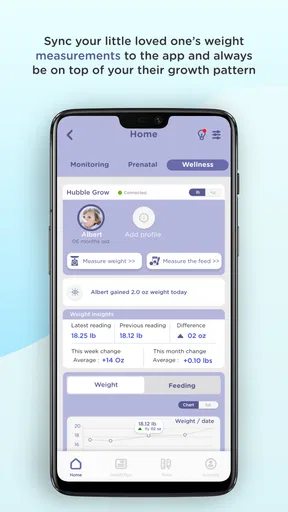
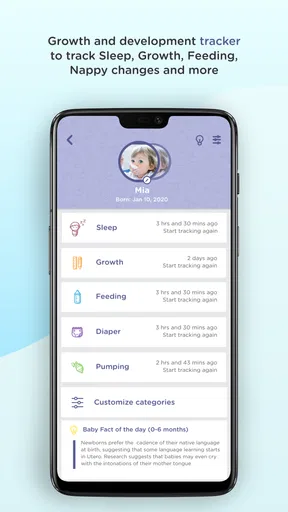
Sleep tracking can add context to that routine, while parenting content gives the app a role beyond camera viewing. I would treat those elements as aids to observation and learning, not as a diagnosis or a replacement for a pediatrician’s advice. A sleep log is most useful when I look for broad patterns over time and share relevant concerns with a professional, rather than reacting to one unusual night.
That is also where a small habit helps: check the app at moments when the information can change what you do. A glance before leaving the room, a look after an alert, or a review at the end of the day is more useful than keeping the live feed open as background entertainment. It saves attention and makes the phone less likely to become the center of the nursery routine.
Your All-in-One Monitoring Solution
Let me walk you through what HubbleClub brings to the table. First off, this app is a hub for all your Hubble Connected devices, which is perfect if you’ve got a few smart cameras and monitors scattered around your home. Once you’ve got the app installed, connecting your devices is as simple as following the on-screen instructions. Trust me, if I can do it, anyone can!
Features That Stand Out
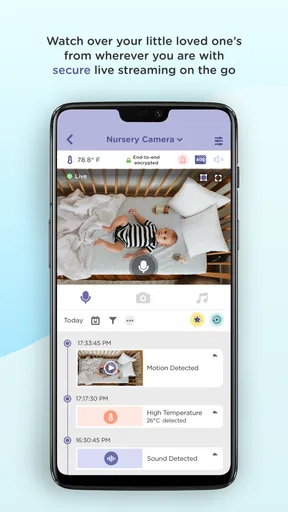
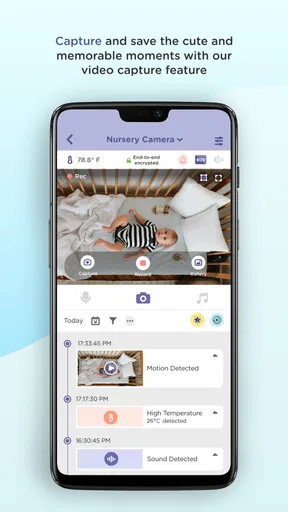
Now, onto the features. The app offers real-time video streaming, which means you can peek into any room with a connected device whenever you want. This is particularly handy if you’ve got kids or pets you want to check on. The video quality is surprisingly crisp, considering it’s coming through an app. You’ve got HD video, night vision, and even two-way audio. Yep, you can talk to whoever’s on the other side, which can be a godsend if you need to calm a restless baby or tell your dog to get off the couch.
One feature I really love is the ability to set up smart alerts. You can program the app to notify you if it detects movement or sound. This is incredibly useful if you’re not glued to your phone all day but still want peace of mind knowing you’ll be alerted if something out of the ordinary happens.
Usability and Interface
The interface is pretty intuitive. It’s not cluttered with unnecessary buttons or complicated menus, which is a relief. You can switch between different cameras with just a tap, and the controls are straightforward. I do appreciate the minimalist design because, honestly, who has time to read through a manual these days?
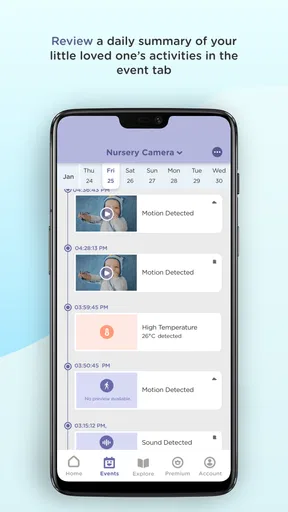
There’s also a timeline feature where you can scroll through past footage. It’s color-coded for different events, so you can easily spot when there was motion or sound. If you’ve ever tried to scroll through hours of footage looking for a specific moment, you’ll know how valuable this can be.
Making alerts and playback useful
Alerts work best when I use them as prompts to check, not as proof that something is wrong. In a busy home, movement and sound can come from ordinary activity, so I would start with a sensible alert setup and adjust it after seeing what triggers notifications during a normal day. If every small sound pulls me back to the phone, the feature stops being helpful; if alerts are too limited, I may miss a moment I meant to notice. A few days of observing the pattern can help find a workable balance.
The timeline has a different job from the live stream. If I missed a notification or want to understand when activity happened, the event markers can make a specific moment easier to locate than scrubbing through footage without a clue. I would use it for a focused question, such as checking when the room became active, rather than treating playback as a substitute for watching continuously. That distinction keeps the review of past footage purposeful.
For households with more than one caregiver, the handoff is just as important as the camera view. One person might handle bedtime while another takes over later; agreeing on who is responding to alerts avoids both people assuming the other has checked. I’d also keep any shared phone or tablet in a predictable place and make sure the person taking over knows how to return to the right camera. A simple routine can prevent a useful alert from getting lost in a notification pile.
Connectivity and Reliability
Here’s where things get a bit tricky. While the app generally works well, the connection can sometimes be a bit patchy, especially if your Wi-Fi isn’t the strongest. I’ve had a couple of instances where the video lagged or the audio was a bit choppy. However, when the connection is solid, the app performs beautifully.
That makes the home network part of the monitoring setup, not an afterthought. Before relying on a camera for a nap-time check, I’d test the view from the places where I actually spend time, such as the kitchen or a different floor. A picture that looks fine beside the router may behave differently farther away. If the stream struggles, moving closer to the access point or improving the household connection may be more useful than repeatedly restarting the app.
I also wouldn’t make a phone stream the only way another caregiver can know what is happening. If a connection drops, a glance at the screen cannot reassure anyone. For families who need a dedicated display or a more direct local monitoring arrangement, a traditional baby monitor may be a better fit. HubbleClub is more appealing when phone access and the wider app features are part of the goal.
It’s also worth mentioning that the app integrates with Google Assistant and Alexa, which adds another layer of convenience if you’re into voice commands. Just imagine saying, “Hey Google, show me the nursery,” and boom, you’re in!
Where it fits among parenting tools
Compared with a basic audio monitor, a connected camera setup gives me a visual check rather than only a sound cue, and the app adds a place to review activity and sleep-related information. Compared with a camera’s own single-purpose app, HubbleClub’s appeal is its connection to Hubble Connected devices and its parenting focus. The trade-off is that the experience depends on compatible hardware, a working network and a phone-based workflow.
That means it is not automatically the best choice for every household. If you want a simple device that works without relying on a smartphone, a conventional monitor may feel less fussy. If you already have Hubble equipment or want monitoring and parenting tools together, keeping those tasks in one app can be more convenient than switching between separate tools. I would choose based on the way I plan to use it, not just the number of features on a screen.
It is also a reasonable option for a caregiver who wants to check in while doing ordinary tasks at home, or for a family that moves between several rooms and values access from a phone. It is less suitable for someone who does not want connected cameras in the home, prefers not to depend on Wi-Fi, or expects a sleep-tracking app to explain a child’s health. In those cases, a simpler monitor or direct guidance from a health professional is the more appropriate route.
Subscription and Extras
While the app is free to download, some of the more advanced features are locked behind a subscription. You’ll need to decide if the extra bells and whistles are worth it for your needs. The subscription offers extended video history, advanced alerts, and more storage. It’s not a dealbreaker, but something to consider.
The sensible way to decide is to start with the routine you need rather than paying for options in anticipation. If I only want to see a live view and receive basic notifications, I would first see whether the free experience covers that. If I regularly need older recordings or find the additional alert and storage options genuinely useful, then I can judge the paid extras against that habit. In-app purchases range from $1.99 to $149.99 per item, so I would read the specific offer shown in the app before confirming anything rather than assuming every plan costs the same.
One practical question is whether sleep tracking will be meaningful without paying for extras. I would separate basic tracking from any premium recording or storage feature and check what is available in the app at the time I set it up. The key is not to assume that every feature mentioned in a monitoring routine is included at no cost. That small check avoids building a family schedule around an option that turns out to require a purchase.
If you’re someone who loves having everything at your fingertips, the subscription might be worth the investment. On the other hand, if you’re more of a casual user, the free version will probably suffice.
Choosing it for your household
HubbleClub is aimed at parents and caregivers, but it can also suit someone who wants to check on a pet using a compatible camera. I would be more cautious about using it as a general home-surveillance solution: its strongest case is a care routine, where viewing, alerts and sleep-related tools have a clear purpose. The app is rated for Everyone, and its parenting focus makes it most relevant to adults managing a child’s daily routine.
There is a useful distinction between “can I check the room?” and “will this replace an adult’s attention?” I would only use the camera as support while staying responsible for the child, not as a reason to leave a baby unattended for longer or to ignore an alert. Two-way audio can help with a quick reassurance, but it is not a substitute for going into the room when the situation calls for hands-on care.
For a shared household, I would agree on a few basics before relying on the system: which camera is the nursery, who responds to sound alerts, and what to do if the stream is unavailable. That is not a special app feature; it is a sensible handoff practice. It reduces confusion when one caregiver is cooking, another is settling the baby, and a notification appears on only one person’s phone.
Final Thoughts
Overall, HubbleClub by Hubble Connected is a solid choice for anyone looking to easily manage and monitor their home’s smart devices. It’s got a user-friendly interface, helpful features, and integrates well with other smart home systems. Sure, it has its moments of connectivity hiccups, but most apps do.
It has been available since May 4, 2021, and version 1.01.54 supports Android 5.0 and later. The app has a 3.9 average from around 6,200 ratings, with about 1,500 written reviews and over 100,000 installs. Those figures suggest an established audience, though I would still weigh recent experiences and my own device setup more heavily than popularity when deciding whether it suits my home.
If you’re in the market for a seamless way to keep an eye on things around the house, give HubbleClub a try. You might find it’s exactly what you’ve been searching for.
My overall recommendation is conditional but clear: choose it when you have compatible Hubble Connected hardware, want phone-based access, and will actually use the added parenting tools. Test the camera from your usual rooms, set alerts around your household’s normal sounds, and decide about paid extras only after you know what your routine needs. If your priority is a self-contained monitor that does not depend on a phone and home Wi-Fi, I would look at that kind of alternative instead.
Privacy and Permissions
See what permissions an app requests and how it handles your data.
- Contacts
- read your contacts
- Location
- approximate location (network-based), precise location (GPS and network-based)
- Phone
- read phone status and identity
- Photos/Media/Files
- read the contents of your USB storage, modify or delete the contents of your USB storage
- Storage
- read the contents of your USB storage, modify or delete the contents of your USB storage
- Camera
- take pictures and videos
- Microphone
- record audio
- Wi-Fi connection information
- view Wi-Fi connections
- Device ID & call information
- read phone status and identity
- Other
- view network connections, pair with Bluetooth devices, access Bluetooth settings, change network connectivity, allow Wi-Fi Multicast reception, connect and disconnect from Wi-Fi, full network access, run at startup, draw over other apps, control vibration, prevent device from sleeping
Verdict
Strengths of HubbleClub By Hubble Connected
- User-friendly interface enhances navigation.
- Seamless integration with smart devices.
- Real-time alerts for peace of mind.
- High-quality video and audio streaming.
- Customizable settings for personal needs.
Limitations of HubbleClub By Hubble Connected
- Limited features in the free version.
- Requires stable internet for optimal use.
- Occasional connectivity issues reported.
- Subscription can be pricey for some users.
- Some features only available on newer devices.
Other Releases by Hubble Connected
View All
Hubble Connected for Motorola
Parenting3.7

Motorola by Hubble Connected
Parenting3.7
Similar Picks in This Category
View All
Family Space
Motorola Mobility LLC.3.9

شرطة الأطفال - مكالمة وهمية
Oub Apps4.1

Findmykids: Parental Control
LETEM LTD4.6

Pregnancy + | Tracker App
Philips Electronics UK Limited4.8

Policía de niños - para padres
Kids police4.7

Pregnancy App
Amila4.9
Frequently Asked Questions
What is HubbleClub by Hubble Connected and what does it offer?
HubbleClub is an app designed to connect with Hubble Connected devices, offering a comprehensive suite of features such as live video streaming, motion detection alerts, and two-way communication. It primarily serves as a monitoring tool for smart home devices, providing users with peace of mind by allowing them to keep an eye on their home from anywhere.
Is HubbleClub compatible with all devices?
HubbleClub is compatible with a range of Hubble Connected devices, including security cameras and baby monitors. However, it is essential to check the specific device model for compatibility. The app is available on both Android and iOS platforms, ensuring a broad reach across most smartphones and tablets.
How secure is the HubbleClub app?
HubbleClub prioritizes user privacy and security by implementing encryption protocols and secure server connections. Users can set up password protection and receive alerts for any suspicious activity. Regular updates ensure that security measures are up-to-date, providing users with a reliable and secure monitoring experience.
What features does HubbleClub offer for parental control?
For parents, HubbleClub provides features like real-time video monitoring, sleep tracking, and motion detection. The app allows for customizable alerts to ensure parents are notified of any unusual activity. Additionally, the two-way communication feature lets parents talk to their children through connected devices, adding an extra layer of interaction and safety.
Are there any subscription fees associated with HubbleClub?
While the HubbleClub app itself is free to download, certain features may require a subscription. These premium features can include enhanced video storage options, advanced analytics, and priority customer support. Users should review the app’s in-app purchase options to determine the best plan for their needs.
